Stamp Guidelines
Stamp Guidelines
Getting ready to order a stamp is really easy. Just follow our simple guidelines and you'll be on your way in no time.
Step 1 - Pick A Size ( Download Our Size Template, Print it Out and choose one of the sizes,
the product number is clearly shown in the box of your chosen size.
Step 2 - Choose your colour. Make sure that you know which colour you would like to use for
your self inking stamp and choose it when ordering.
Step 3 - Stamp Design. Upload Your Logo, Image or type in your text and place your order.
Step 4 - Thats It ! Just leave it up to us to make and deliver your customised stamp to your
letterbox.
Image/ Logo Considerations
Whilst we strive to provide you with the best quality rubber stamps possible, please note our
recommendations for achiving the best quality image for stamping.
| File Format | Resolution | Scale | Color |
| Jpeg | 300 DPI | 1:1 | Monochrome (B&W) |
| Tiff | 300 DPI | 1:1 | Monochrome (B&W) |
| Photoshop (PSD) | 300 DPI | 1:1 | Monochrome (B&W) |
| Freehand MX (FH11) | Vector | 1:1 | Monochrome (B&W) |
| GIF | 300 DPI | 1:1 | Monochrome (B&W) |
| PNG | 300 DPI | 1:1 | Monochrome (B&W) |
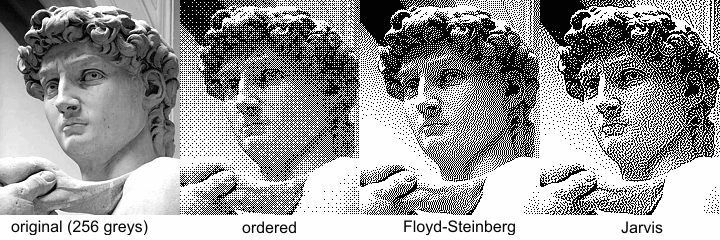
Please also note that images/logos must be provided in Black & White (Monochrome), if these
are provided in color we shall modify them to black & white. Ensure that the image is not in
greyscale but in a solid black or if neccesary a dithered patter as can be seen below.
You have no items to compare.
You have no items in your shopping basket.